Painting Estimate-to-Profit Spreadsheet
Build the estimate. Keep approved scope changes separate. Track actual labor and materials. Forecast where the job is heading. Close it with final economics and see where profit faded or improved.
Designed for Microsoft Excel 2021 and Microsoft 365 Desktop. No macros required.
Current price, availability and checkout come from the commercial Product Registry.
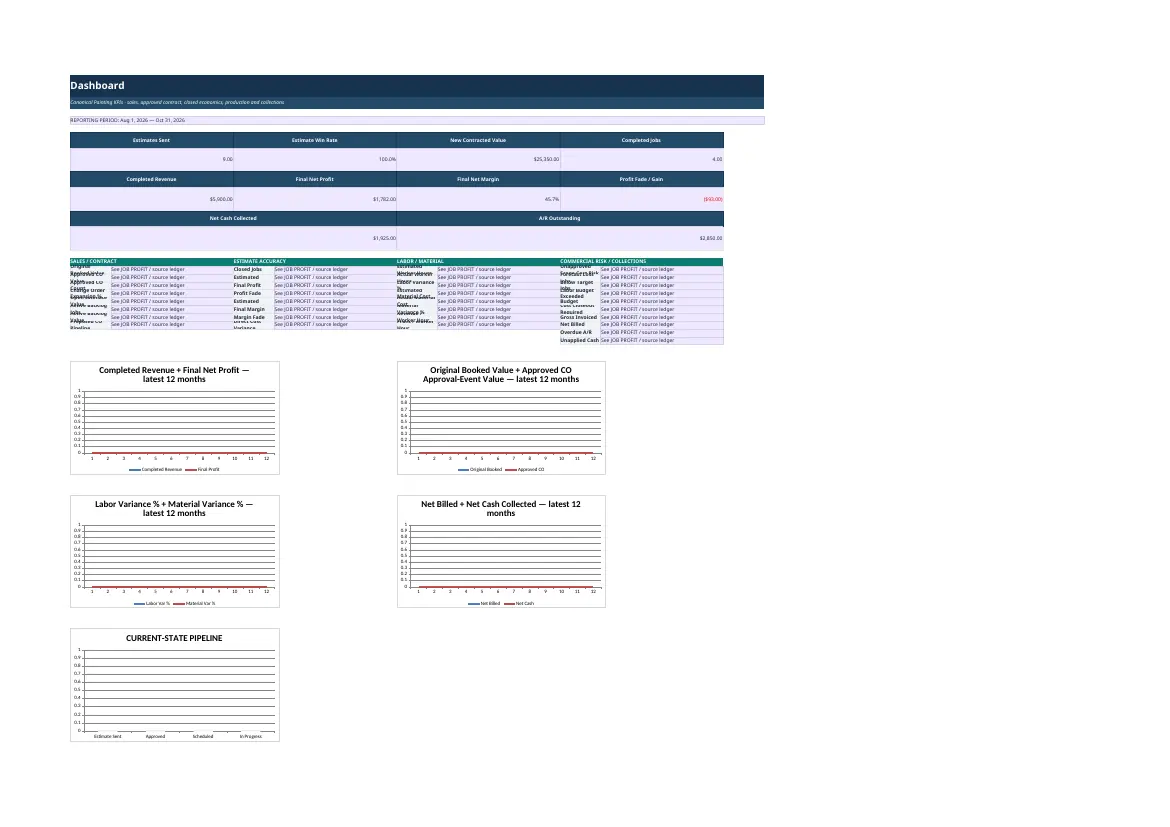
Actual released workbook interface. Populated screens use approved fictional demo data.
Who it is for
Built for painting business owners and estimators who need structured production-rate and material estimating, plus a way to keep the approved estimate connected to what actually happens after the job starts.
An estimate is the baseline, not the finish line
A strong estimate answers what the job should require and what it should earn. Painting work then changes through production, prep, material use, scope changes, actual labor, actual purchases, billing, and closeout. OwnerLanes keeps those layers separate so the final result can be compared with the approved plan.
Estimate → Approve → Control changes → Execute → Forecast → Final → Learn
Build scope from activities, measured quantities, coats, production rates, prep, materials, labor, travel, direct costs, overhead, and target economics. Preserve the original or approved baseline, record approved Change Orders separately, capture actual costs, forecast remaining cost, then compare the final outcome with what was expected.
Production-rate estimating
Production rates are treated as measured units per worker hour per coat. Crew size affects estimated duration and site days; it does not multiply the worker hours required to perform the same measured scope. Prep remains a separate labor layer rather than being multiplied by every paint coat.
Materials and coverage
Coverage-based material estimating can convert measured work into paintable square feet, coats, waste, coverage per purchase unit, and material cost. The system distinguishes whole-purchase-unit economics from proportional usage where appropriate instead of silently treating every measured quantity as square feet.
Change Orders protect estimate accuracy
The approved baseline should not be rewritten every time scope changes. OwnerLanes keeps Change Orders separate so the owner can distinguish an estimating miss from work that was added or changed after approval.
Forecast is not Final
Forecast shows where the job is expected to land using actual cost to date plus expected remaining cost. Final economics belong to the closed job. The website and workbook never label Forecast Profit as actual Final Profit.
Estimate accuracy and Profit Fade
The system compares approved estimated economics with final results, including labor and material variance and profit fade or gain. This helps turn completed work into better future estimating decisions rather than leaving the estimate disconnected from production reality.
What is included
- 15 connected worksheets covering setup, estimating libraries, Pricing Lab, job and scope workflow, client estimate, Change Orders, actual costs, billing and payments, client invoice, profitability, Dashboard, Action Center, and Monthly Summary.
- Distinct Original Estimate or approved-contract, Forecast, and Final economic layers.
- Production-rate, prep, material-coverage, labor, travel, overhead, margin, actual-cost, billing, and estimate-accuracy controls.
- CLEAN workbook plus DEMO/reference workbook and operating documentation.
- No macros are required.
Free calculator vs. full system
The free Painting Estimate Calculator calculates labor, materials, mobilization, direct cost, site days, and a target-margin price for a temporary scenario. The paid system adds saved libraries, jobs, scope, customer estimates, approved-change control, actual costs, billing, forecast, final profit, estimate accuracy, dashboards, and history.
What OwnerLanes does not replace
This product is not blueprint takeoff, AI measurement or image recognition, dispatch, payroll, accounting, inventory, QuickBooks integration, automated SMS or email, OSHA or compliance, legal, or tax software.
Frequently asked questions
Does crew size increase the estimated worker hours?
No. Worker hours come from measured quantity, coats, production rate, difficulty, and prep. Crew size estimates duration or site days.
Does prep get multiplied by the number of paint coats?
No. Prep is estimated independently from application coats.
Can I track Change Orders separately from the original estimate?
Yes. Keeping approved changes separate protects the integrity of the original or approved baseline.
Is Forecast Profit the same as Final Profit?
No. Forecast is an expected outcome before closeout. Final economics are the completed-job result.
Does OwnerLanes replace painting estimating or accounting software?
No. It is an Excel-based estimating and job-economics system, not a CRM, dispatch, or accounting platform.
What you receive
The package contents shown here reflect the approved commercial delivery for this product.
- CLEAN WorkbookA clean-start Excel workbook for your own estimating libraries and projects.
- DEMO / Reference WorkbookA populated reference showing the estimate-to-profit workflow.
- Operating DocumentationGuidance for setup, safe use and the recommended workflow.
Digital files are delivered electronically after successful payment. No macros are required.
A closer look inside the released system
Select any view to open a large, readable preview. Use the arrow keys to move between screens and Escape to close.
Start with the economics before the next job.
The free calculator answers one scenario. The full system carries the workflow forward.