Junk Removal Quote-to-Profit Spreadsheet
Price the job from your own economics, turn it into a professional quote, account for disposal and travel, track what the work actually costs, keep billing visible, and see what the job really earned.
Designed for Microsoft Excel 2021 and Microsoft 365 Desktop. No macros required.
Current price, availability and checkout come from the commercial Product Registry.
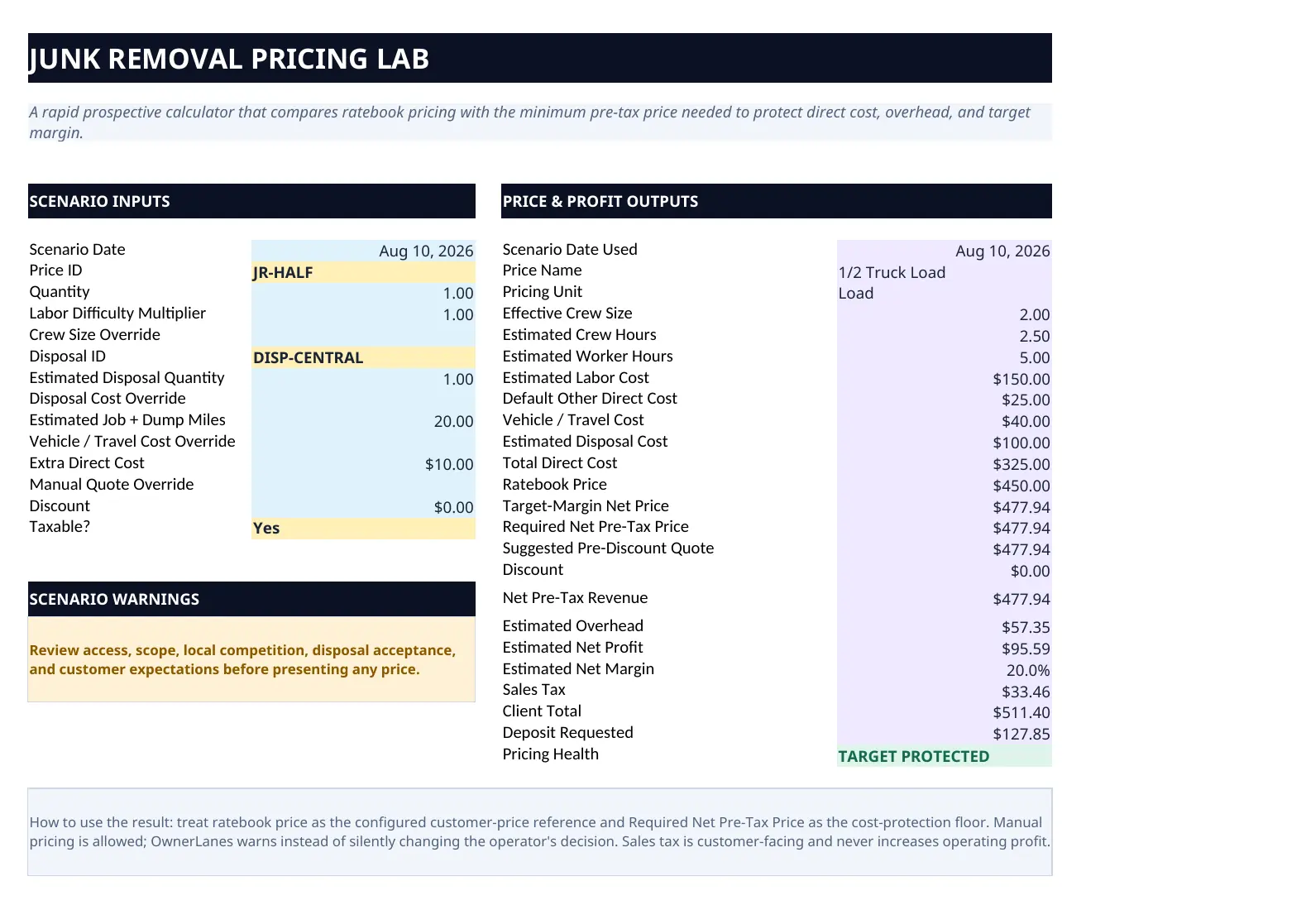
Actual released workbook interface. Populated screens use approved fictional demo data.
Who it is for
Built for owner-operators and small junk-removal or hauling businesses that want more control than a simple load-price list, but do not need OwnerLanes to pretend an Excel workbook is dispatch, GPS, fleet-management, accounting, or CRM software.
Why junk-removal pricing needs more than truck space
Volume can be a useful quoting reference, but the job still has to absorb labor, disposal, travel, special handling, other direct costs, overhead, and minimum-charge economics. Two jobs that look similar in the truck can produce very different profit when disposal or labor changes.
Price → Quote → Dispose → Track → Bill → Know the profit
Set up your business economics, Pricing Library, and Disposal Library. Test a job in the Pricing Lab, then create the job and customer quote. Record actual job costs as the work happens, keep invoices and payments visible, and use Job Profit and management views to compare what you expected with what the job actually produced.
Disposal economics are part of the job
Disposal is not a generic percentage hidden inside a price. The system gives disposal its own economic role so facility cost, special handling, and job-specific disposal decisions can be reflected instead of disappearing inside a single flat number.
Estimate vs. actual
The quote is a plan. Actual Costs are what really happened. Keeping those layers separate helps you identify whether labor, disposal, travel, or another cost category moved away from the estimate and changed the result.
Billing and cash are not profit
The workbook keeps operating profitability separate from customer-facing invoicing and cash collection. A job can be profitable and still have money outstanding, or collected and still have weak economics. The system is designed to keep both questions visible without treating them as the same thing.
What is included
- 15 connected worksheets covering setup, pricing and disposal libraries, Pricing Lab, job and quote workflow, actual costs, billing and payments, client documents, Job Profit, Dashboard, Action Center, and Monthly Summary.
- Customer-facing quote and invoice views kept separate from internal cost, overhead, margin, and profit information.
- CLEAN workbook plus a DEMO/reference workflow.
- No macros; product-specific compatibility guidance is included in the final package.
Free calculator vs. full system
The free Junk Removal Pricing Calculator answers a pricing decision using labor, disposal, travel, direct costs, overhead, target margin, and minimum charge. The paid system continues into saved jobs, quoting, actual costs, billing, collections, final job profit, dashboards, and operating follow-up.
What OwnerLanes does not replace
This product is not bookkeeping, tax filing, payroll, GPS or route optimization, automated messaging, fleet-maintenance software, or an accounting-system integration. It is a job-level pricing, quote, cost, billing-visibility, and profitability system.
Frequently asked questions
Is this only a junk removal pricing calculator?
No. Pricing is the starting point. The full workbook connects pricing and disposal economics with quotes, actual costs, billing, collections, and job profitability.
Does it tell me what junk removal companies in my market should charge?
No. OwnerLanes is designed around your own labor, disposal, travel, overhead, minimums, and margin targets. Demo values are not national pricing recommendations.
Does it replace accounting software?
No. It is an operating decision-support workbook, not a general ledger, tax-filing, payroll, or bookkeeping platform.
Does the customer see my internal profit or cost data?
The client-facing quote and invoice are designed to remain separate from internal cost, overhead, margin, and profit information.
Is this a subscription?
Use the current Product Registry, checkout, and Terms page for the exact commercial terms shown at purchase.
What you receive
The package contents shown here reflect the approved commercial delivery for this product.
- CLEAN WorkbookA clean-start Excel workbook for your own libraries, jobs and customers.
- DEMO / Reference WorkbookA populated workflow reference using fictional business data.
Digital files are delivered electronically after successful payment. No macros are required.
A closer look inside the released system
Select any view to open a large, readable preview. Use the arrow keys to move between screens and Escape to close.
Start with the economics before the next job.
The free calculator answers one scenario. The full system carries the workflow forward.